fm
A read-only mirror of https://git.kyotam.com/sigrid. It updates only from there.
| Name | Last commit date |
|---|---|
| a.h | 5 years ago |
| b | 5 years ago |
| fm.c | 5 years ago |
| fm.png | 5 years ago |
| LICENSE | 5 years ago |
| main.c | 5 years ago |
| mkfile | 5 years ago |
| README.md | 5 years ago |


fm
fm provides a gui to select an item from a list using a fuzzy matching algorithm.
When an item is selected, it is sent to the plumber send port unless the -p option
is used in which case the item name is printed on standard output and the application exits.
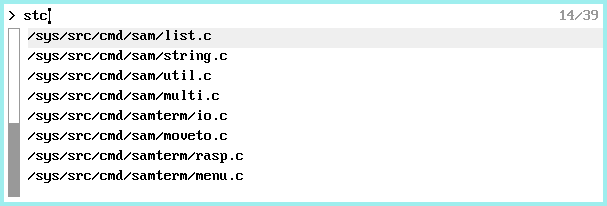
Left-click an item to select it.
Right-click to activate the selected item.
Keyboard shortcuts:
- Arrow up / down change selection
- Enter activate selection
- Page up / down scroll by one screen page
- Home go to first item in the list
- End go to last item in the list
- Ctrl-U clears the input line
- Esc clears the input line unless input is empty in which case it exits fm
- Del to exit fm
Usage:
Install with usual mk install
Run: ... | fm [-p]
The provided b script gives a usage example.
Credits:
The fuzzy matching algorithm has been ported from:
Bugs:
Obviously!